
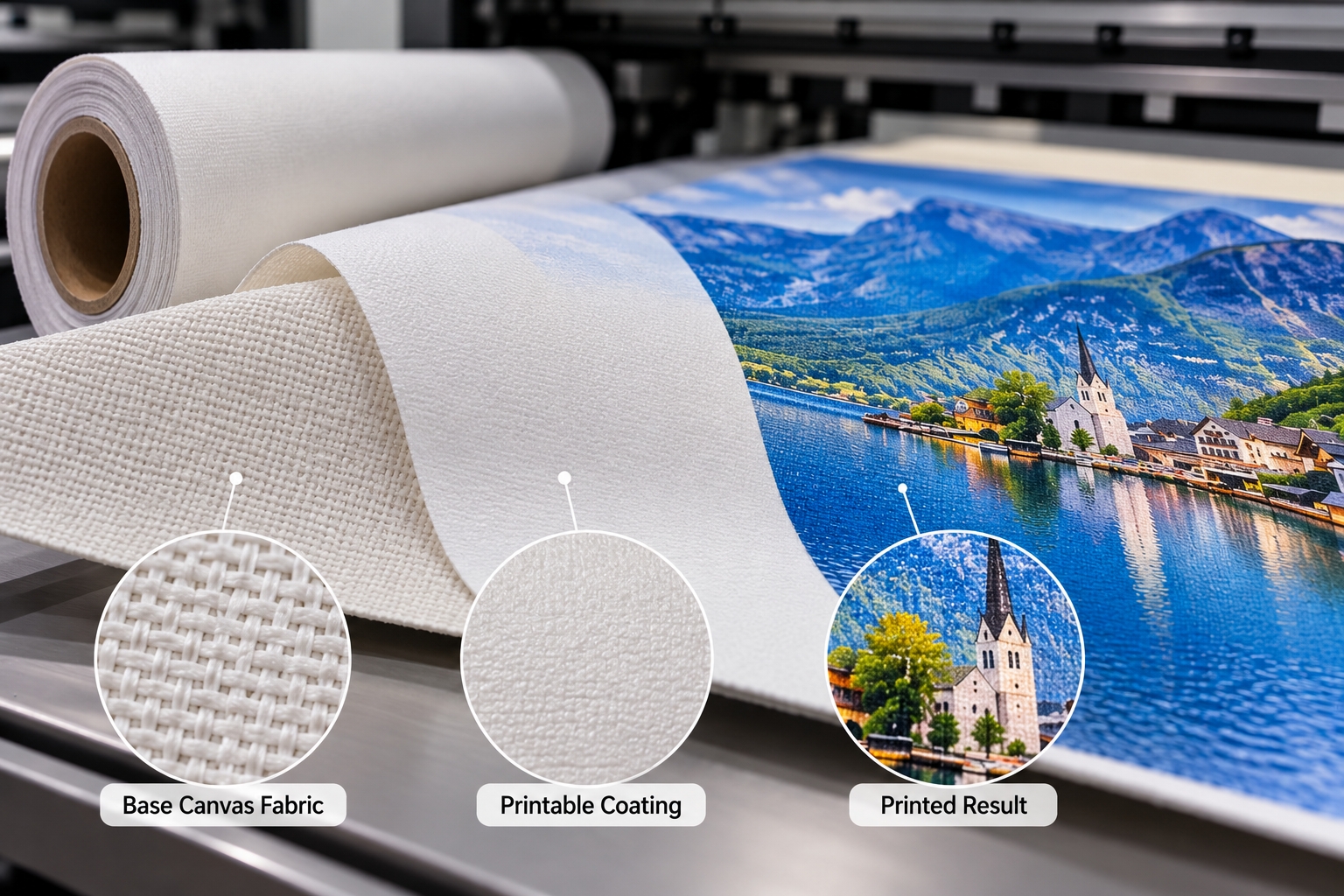
Printable canvas coating is a functional surface layer or coating system engineered to control how the intended ink interacts with the canvas. It can influence where ink remains, how far it spreads, how clearly dots and fine details are reproduced, how the print dries or cures, and how the finished surface looks and handles.
The coating does not determine print quality by itself. The result comes from the base fabric, printable coating, printer, ink, RIP and profile settings, ink load, drying or curing, environment, finishing and the interaction between these variables.
Two canvas rolls can have the same nominal GSM, similar fiber composition and a similar weave but still print differently because their coating systems, surface finishes and intended ink compatibility are different.
What Is Printable Canvas Coating?
Printable canvas coating is the engineered surface between the base fabric and the printing ink. Depending on the product and production method, the printable surface may involve fabric preparation, one or more functional coating stages, or a broader coating system. There is no single universal structure used by every printable canvas.
The basic concept is:
Base fabric → surface preparation or coating system → printable surface → interaction with the intended ink.
The coating system is developed around practical requirements such as ink reception, dot control, surface uniformity, finish and compatibility with the target printing process. Its exact formulation is product-specific and cannot be determined from GSM, fabric composition or visual appearance alone.
Why Can’t Ordinary Fabric Automatically Be Used as Printable Canvas?
Untreated or differently treated fabric does not automatically provide the ink control, surface uniformity, sharpness, density or adhesion required by a particular digital printing workflow. Ink may penetrate too far, spread laterally, remain unevenly on the surface or fail to create the intended image appearance.
This does not mean ordinary textile can never be printed. Textile printing technologies may use their own pretreatments, inks and production processes. The distinction is that a purpose-designed printable canvas is prepared for a defined digital printing application rather than assumed to work because the base material is cotton, polyester or poly-cotton.
What Does Printable Canvas Coating Actually Control?
| Function | What the Coating Influences | What the Printer May Observe |
|---|---|---|
| Ink reception | How the intended ink wets, remains on or interacts with the surface | Stable ink laydown, excessive penetration, beading or uneven reception |
| Ink spreading and dot control | Lateral movement of ink before it sets | Fine-line definition, text clarity and clean color boundaries |
| Print sharpness | How consistently printed dots and image details are held | Crisp or softened detail, depending on the complete print setup |
| Color density | Ink holdout, penetration and optical interaction at the surface | Differences in apparent saturation, dark areas and black performance |
| Surface uniformity | Consistency of the printable surface across width and length | Uniform solids or localized differences that require investigation |
| Drying or setting behavior | How ink and the surface behave before the print becomes ready for handling | Smearing, transfer, tackiness or stable handling, depending on the ink system |
| Adhesion | Interaction between the printed ink layer and the prepared surface | Whether the print remains suitable through the intended handling and finishing tests |
| Matt, satin or glossy appearance | How the surface reflects light before and after printing | Different glare, reflection, texture and perceived image depth |
| High ink-load behavior | How the surface manages heavy ink deposition with the selected settings | Uniform dark solids or possible coalescence, mottling and slow drying |
Each result also depends on the printer, ink, media preset, profile, ink load and production environment. Coating is a critical part of the system, not the only part.
How Does Coating Affect Ink Bleeding and Print Sharpness?
When ink spreads laterally before it is sufficiently controlled or set, fine lines, small text and color boundaries can lose definition. The printable surface influences this movement, but bleeding can also result from excessive ink load, an unsuitable media preset, print mode, RIP settings, printer condition or environmental factors.
A fair test therefore keeps the file and production conditions controlled while comparing settings or media. The symptom should not be reduced to “bad coating” without evidence. Gowin’s guide to ink bleeding and spreading on printable canvas explains the complete troubleshooting logic in more detail.
How Can Coating Affect Color Density and Black Performance?
A coating system can influence how much ink remains near the visible surface, how much enters the media structure and how uniformly the colorant is presented to the viewer. These differences can change apparent density, saturation and black appearance even when two media are printed with the same nominal settings.
Coating alone does not determine gamut or black performance. Printer condition, ink chemistry, total ink limit, print mode, profiling, surface finish and viewing light also matter. If one canvas requires a different ink limit or profile, that does not by itself mean one product is better; it means the complete media setup is different.
How Does Coating Affect Drying or Curing?
Different ink technologies do not dry or cure through one common mechanism. With aqueous inkjet, the printable surface must manage a water-based ink vehicle while controlling colorant placement as the liquid phase interacts with the coating and is removed through absorption and evaporation. Eco-solvent printing depends on the interaction between solvent ink, the prepared media surface, printer heat and drying conditions.
Latex systems use a water-based ink vehicle together with printer-controlled drying and film formation, often involving heat and airflow. UV ink is polymerized by UV energy at or near the media surface, so ink adhesion, surface texture and flexibility still need to be assessed even though the ink does not dry by the same process as aqueous or eco-solvent ink.
For this reason, a coating or media should be evaluated with the intended printer and ink technology. A drying time or curing setting that works for one system should not be transferred to another as a universal rule.
Are Eco-Solvent, Aqueous, Latex and UV Canvas Coatings the Same?
Not necessarily. Coating formulations and surface designs may be optimized differently for the target ink technology, image requirements and manufacturing process. Some printable canvas products support more than one system, but multi-system compatibility should come from the product specification and practical testing rather than assumption.
| Printing System | What Must Be Considered | Why Testing Matters |
|---|---|---|
| Aqueous inkjet | Ink reception, lateral spread, density, drying and dye or pigment compatibility | Confirms sharpness, solid-area behavior and handling with the intended ink |
| Eco-solvent | Surface interaction, ink load, drying, adhesion and printer heat settings | Shows whether the media, profile and production speed work together |
| Latex | Media compatibility, heat exposure, drying, film formation and dimensional behavior | Confirms print appearance and media behavior at the intended production settings |
| UV | Surface adhesion, cured ink appearance, texture and flexibility for finishing | Confirms that the printed and cured result suits the intended application |
Before selecting a product, compare the intended printer and ink with Gowin’s guide to choosing printable canvas for different printing systems. Gowin’s eco-solvent canvas roll range provides a more focused starting point for eco-solvent production.
Does More Coating Mean Better Printable Canvas?
No. Print performance depends on the coating formulation, applied amount, uniformity, compatibility with the base fabric and ink, process control and the final production setup. A higher coating weight is not automatically better, and more coating passes do not automatically produce a better printable canvas.
Too little, too much or poorly controlled application can all create problems depending on the coating system. The relevant question is whether the finished media meets the required printing, handling and finishing performance consistently.
Why Can Two 240gsm Polyester Canvas Rolls Print Differently?
GSM and fiber composition do not fully define printable performance. Two products listed as 240gsm and 100% polyester can still use different base-fabric constructions, weave, coating formulations, coating amounts, application processes, surface finishes and intended ink systems. They may also differ in dimensional behavior and coating uniformity.
GSM is an important specification, but it is not a complete description of print performance. Gowin’s Canvas GSM Guide explains how weight should be considered together with material, construction, coating and application.
What Does Coating Uniformity Mean?
Coating uniformity means that the functional printable surface remains sufficiently consistent across the roll width and length and from roll to roll or batch to batch within the approved specification. It supports repeatable ink reception, surface appearance and production setup.
Localized density differences, uneven gloss, patchy ink reception, inconsistent drying, mottling or localized spreading may justify investigation. They do not automatically prove non-uniform coating because printer condition, ink load, settings, environment and handling can produce similar symptoms. Compare another area or roll under controlled conditions before assigning the cause.
How Should Buyers Evaluate Printable Canvas Coating?
- Inspect the blank surface. Check visible uniformity, finish and obvious contamination or damage.
- Use a controlled test file. Keep the file, printer, ink and settings consistent during comparisons.
- Print fine lines and small text. Examine edge definition and lateral spreading.
- Inspect solid colors and dark areas. Look for density variation, coalescence or mottling.
- Evaluate gradients. Check tonal continuity and transitions.
- Inspect the reverse side where relevant. Note penetration or transfer that affects the intended workflow.
- Check drying or curing behavior. Follow the intended printer and ink process rather than a universal time.
- Evaluate adhesion and handling. Use the handling tests relevant to the finished product.
- Perform the intended finishing. Include cutting, stretching, framing or other production steps where applicable.
- Compare with the approved reference. Keep an approved sample and documented settings for repeat orders.
These checks can be included in Gowin’s wider printable canvas sample approval process. When comparing matt, satin and glossy surfaces, also review the printable canvas finish guide.
What Should Buyers Ask a Printable Canvas Supplier?
- Which printing system is the canvas designed or specified for?
- What base material and fabric construction are used?
- What is the nominal GSM?
- Is the surface matt, satin or glossy?
- Has compatibility been evaluated with the intended ink technology?
- Can a sample be tested before bulk ordering?
- What specification will be used as the reference for repeat orders?
- How will relevant product or specification changes be communicated?
For available materials, finishes and printing-system categories, review Gowin’s printable canvas roll range.
Frequently Asked Questions
Does all printable canvas have a coating?
Not necessarily in one universal form. Purpose-designed printable canvas typically relies on surface preparation, a functional coating system, or a combination of treatments to achieve the required print behavior. The structure and process vary by product, base fabric and intended ink technology.
Is a thicker coating better?
No. Coating performance depends on formulation, applied amount, uniformity, compatibility and process control. Greater thickness or more passes do not automatically improve printing.
Can the same canvas work with eco-solvent, latex and UV printing?
Some products may support multiple systems, but compatibility is not automatic. Confirm the product specification and test the canvas with the intended printer, ink, settings and finishing process.
Why does canvas with the same GSM print differently?
GSM does not describe the complete media. Fabric construction, weave, coating system, surface finish, manufacturing process and ink compatibility can differ even when nominal weight is the same.
Can an ICC profile compensate for coating differences?
A profile can optimize color reproduction within a workable printer, ink and media combination. It cannot repair physical incompatibility, inconsistent ink reception, poor adhesion or a coating defect.
Request a Printable Canvas Sample from Gowin
When requesting a sample, provide the printer model, ink system, required width, preferred finish, application, estimated quantity and destination. Test the sample with the intended printer settings and finishing process before bulk approval.